Back
Console 2.0 at UPowr
Research, product design, and design management · 2025
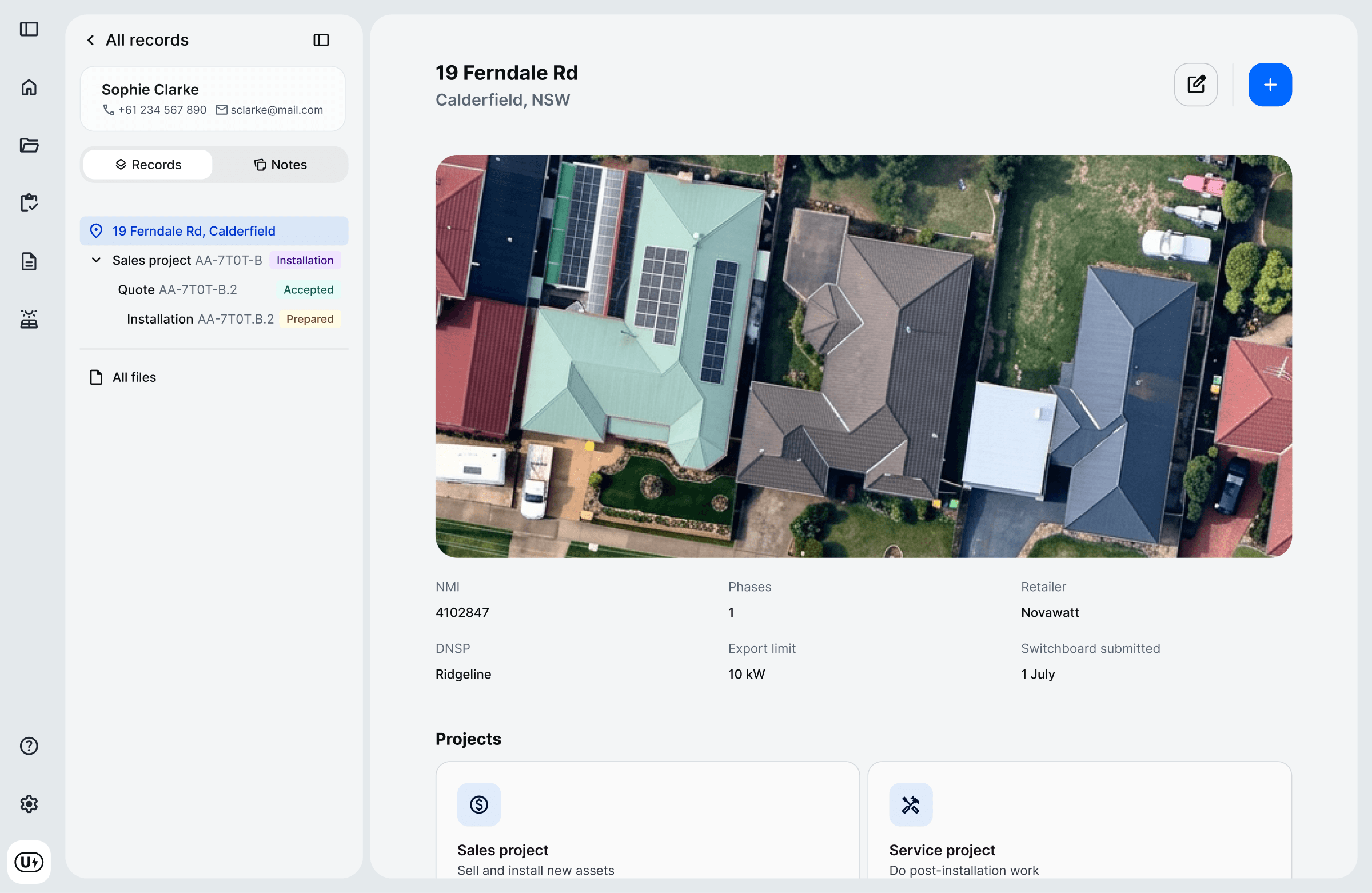
UPowr makes software for managing solar and battery sales, installations, and servicing. Console is its operator platform that sales, system design, and ops teams use to manage customer projects. By early 2025, it wasn’t working for them.
Console is really good at capturing the job as it’s supposed to happen. But jobs very rarely happen as they’re supposed to.
Console ran on Retool, an expensive and restrictive low-code dev platform, which we wanted to migrate off. I pitched a redesign and rebuild to properly address the operator feedback we’d heard.

The old Retool version
I led the research and synthesis, wrote our design principles, and mocked up early layouts. Then I guided a designer I managed through the hi-fi work and user testing.
Research
The interviews. I designed the protocol and interviewed eight operators across five roles. In each session, I had them list the activities they did in Console and rank them, before walking us through the most important ones, thinking out loud. Then I analysed the interviews in Dovetail.

The analysis in Dovetail
The interviews surfaced eight usability issues that I consolidated into three design principles.
Increase information density. Comparing records took too many clicks. For example, a sales call about three quotes meant opening each one in a new tab.
Tell the story. To investigate an issue, operators had to click through nested records. They often had to traverse a hierarchy of customer → site → project → quote → job to piece together what happened.
When you first open that first page in the Console, you should be able to get the basic information very quickly. Sometimes it’s actually pretty hard to decipher what’s going on.
Lighten mental load. Actions were located on specific records inside menus. This meant that operators had to remember the record, navigate to it through the hierarchy, then find the right menu. In one interview, an operator went to the customer, then the project, before finding what they needed on the site.
The baseline survey. In addition, I designed a 10-item survey to assess the existing Console. Twenty operators across three customers gave it an average of 2.69 out of 5. The two lowest-scoring items were knowing which work needed attention and finding the information required to complete a task. Both matched what the interviews found.
With the principles set, we then pulled together a customer reference group to ensure we were building the right thing.
Customer reference group
How it ran. The group included representatives from three companies that used Console daily. For twelve weeks, we’d present new work, they’d provide feedback, then we’d iterate. I shaped the format and decided what to show. The other designer facilitated.
What we showed first. Before the first session, I prototyped a new project workspace layout to address the issues from the interviews. Presenting this early and getting feedback helped us know we were on the right track.
The 2 lowest scoring questions
What changed. Two changes came out of later sessions. One operator mentioned that when they needed a file, they didn’t always know which record it sat on, so we added a central files page. The financial summary on a quote that sales relied on was also rebuilt after the group walked us through its usability issues.
The CRG sharpened the work and validated the architecture before we built it at scale.
What we shipped
Three things shipped that mattered most.
The four-surface layout. What we’d validated with the CRG became the architecture for every record type.
An action area that kept context visible. Tasks such as preparing a quote or reviewing an installation move a project forward. We put them on their own surface, so operators could click between records to check details and notes without leaving the task.
Comparison tables on parent records. We built scannable tables that surfaced the most-needed fields for each child record, so operators could compare records without opening each one.
The trade-off. Due to our deadline, the new Console was not as polished as we would have liked. But we decided to ship, knowing we’d come back.

Comparison tables on the project record
Outcomes
A week after launch, we ran a retro with our largest customer.
What landed. Operators called out the increased visibility of information, the sidebar, and the multi-screen layout.
Side bar of site → project → quote on the customer record. Clear visibility of what exists and their statuses.
Multi-screen layout makes tasks easier to complete.
What missed the mark. The new search was unreliable, and the central files page that we added didn’t contain enough context to help the operator understand where the file came from.
What we changed after. We fixed search and added context to the files page. Then we made further UI iterations using the design principles. To improve information density, customer details were moved to a small always-visible card. To help tell the story, we added a chronological activity feed that pulled events across all of a customer’s projects. And to lighten the mental load, we pulled frequently used actions out of menus.
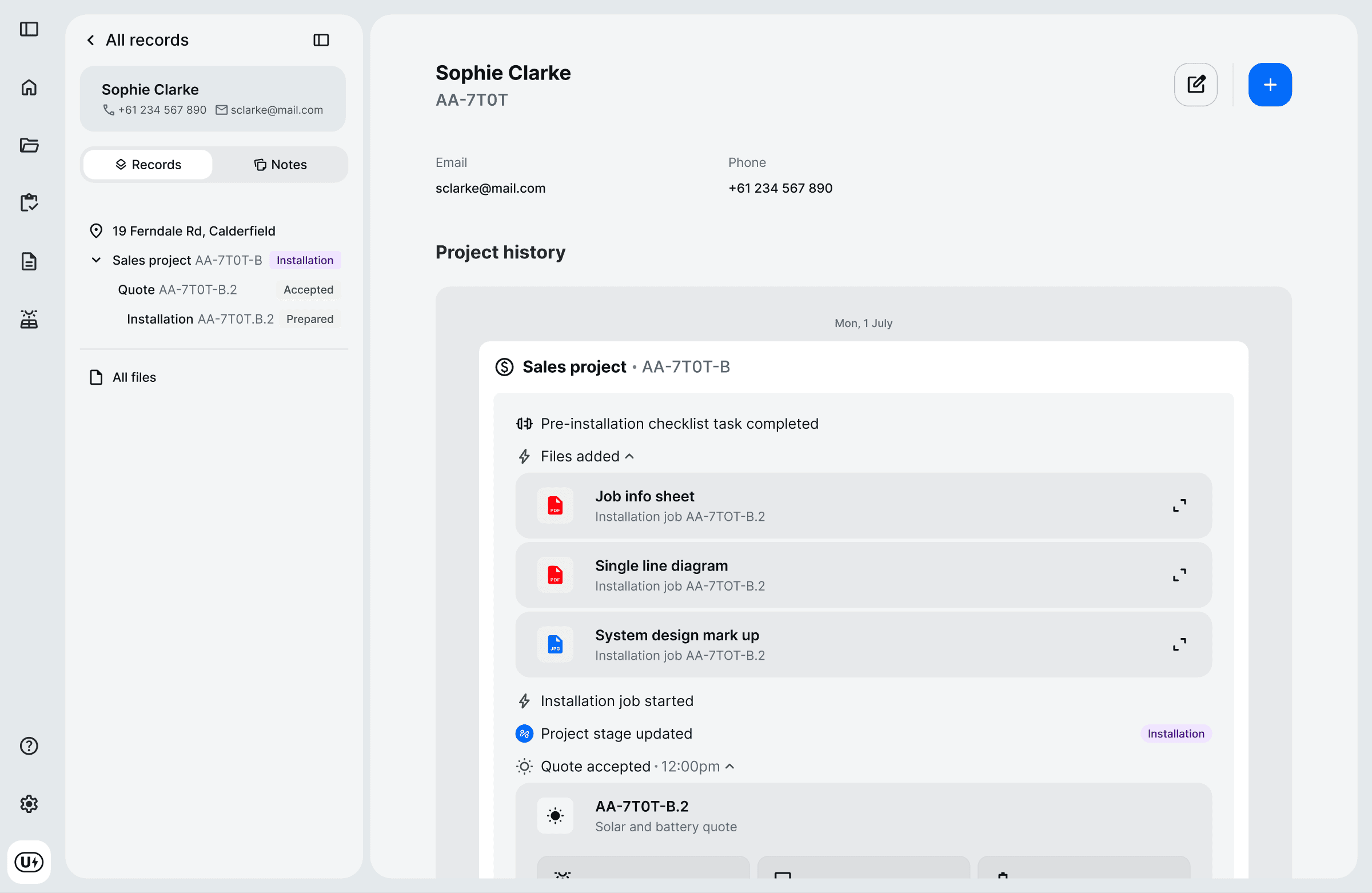
The activity feed
Key lesson
What I’d do differently is set up a comparable post-launch measure before we started. I ran a baseline, but never repeated it after launch, so there was nothing clean to compare against, and we had to rely on retro signals and customer feedback.